Best SEO Tools for Mac (2026): What Runs Natively on macOS
- How This List Was Chosen
- Desktop Crawlers for Mac
- Live-Page Checkers Already on Your Mac
- Browser-Based Audits That Need No Install
- Comparison Table
- A Sensible Mac SEO Stack
- Frequently Asked Questions
Search for SEO tools for Mac and most results list Ahrefs, Semrush and Google Search Console. Those are websites. They run on a Mac the way they run on anything with a browser, and they tell you nothing about what runs on the machine itself.
This list is narrower on purpose. It covers tools that execute on macOS: crawlers that fetch and render your pages locally, and page checkers already built into the browsers you have installed. Each entry states what it costs, what it is for and where it stops. Pricing was checked at the time of writing; confirm on the vendor's site before you commit.
How This List Was Chosen
Three tests, applied to each tool:
- 01It runs as a native or Java desktop application on macOS 14 or later, or it ships inside a browser already on the Mac.
- 02It does something a web dashboard cannot: crawl a staging site, keep data on the machine, work without an account, or measure rendering locally.
- 03The job it is for can be stated in one sentence.
Web suites are covered elsewhere; our guides on Ahrefs alternatives and the full SaaS SEO tool stack go through them.
Desktop Crawlers for Mac
A crawler is the one category where running locally matters. It fetches every page, follows every link and keeps the results on disk, which means staging sites, password-protected environments and very large sites are all in reach.
HubSEO Spider (free, macOS 14+)
HubSEO Spider is a free desktop crawler built for macOS. Spider mode starts from one URL, respects robots.txt and seeds from the XML sitemaps it finds; list mode crawls exactly the URLs you paste. Pages are rendered in a hidden Chromium on your Mac, so JavaScript-built content is seen the way a modern crawler sees it.
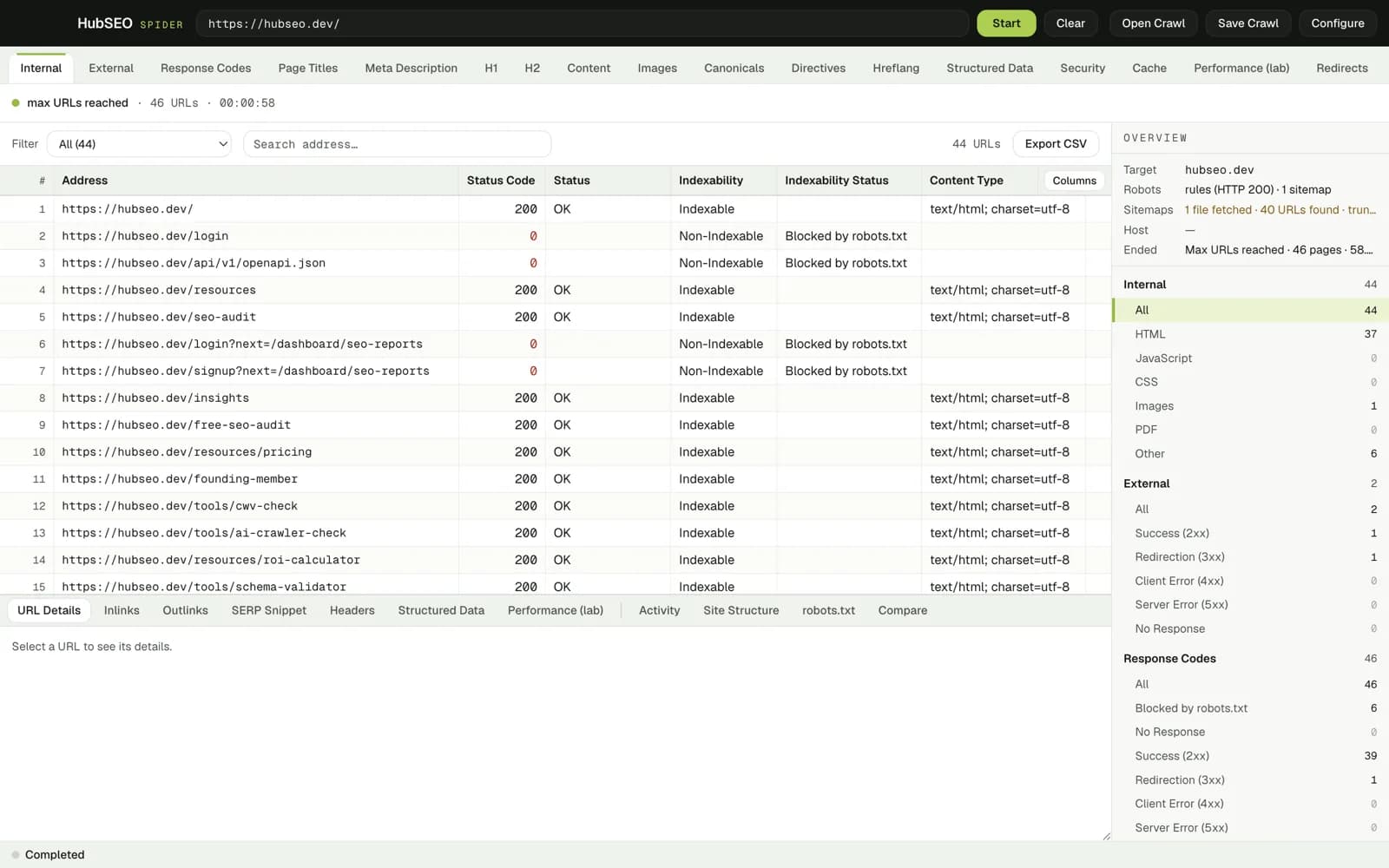
What you get per crawl:
- 19 filter tabs over one grid: Internal, External, Response Codes, Page Titles, Meta Description, H1, H2, Content, Images, Canonicals, Directives, Hreflang, Structured Data, Security, Cache, Performance, Redirects, Sitemap and Custom
- 11 panels for the selected URL, including Inlinks, Outlinks, Headers, raw JSON-LD with a Copy button, robots.txt as served and a Compare view for two saved crawls
- Lab performance per page: TTFB, DOMContentLoaded, Load, LCP and CLS from a single unthrottled render, with the Web Vitals thresholds printed under each figure and the measurement labelled as lab rather than field
- A SERP snippet preview that measures title and description in pixels and characters against the 600 px / 60 character and 920 px / 155 character guides
- Near-duplicate detection by simhash in the Content tab, and HSTS, CSP and other headers per URL in the Security tab
- CSV export from any tab, Save Crawl and Open Crawl, and an Activity log of every fetch
Threads, delay, URL budget and depth are set per crawl. There is no URL cap, no account, no licence key, and nothing is sent to HubSEO or anyone else. Version 0.2.0 ships as two disk images: 129 MB for Apple silicon and 136 MB for Intel, both for macOS 14 or later. It is ad-hoc signed and not yet notarised, so the first launch is right-click, Open.
Where it stops: Spider has no scheduling, no Search Console or Analytics integration, and it is macOS only.
Screaming Frog SEO Spider (free to 500 URLs; £199 per year)
The reference desktop crawler for over a decade. A Java application for Windows, macOS and Linux with custom extraction (XPath, CSS, regex), Search Console and Analytics integrations, scheduled crawls and a very deep feature set. The free tier crawls up to 500 URLs; the paid licence removes the cap.
Pick it for agency-scale audits, redirect mapping across tens of thousands of URLs, and custom extraction. Our Screaming Frog comparison and the piece on Screaming Frog alternatives for developers go into detail.
Sitebulb (paid subscription)
A desktop crawler for Mac and Windows known for visual, scored reports and prioritised hints written for people who are not SEO specialists. It is the strongest option when the output has to be read by a developer or a client without translation. Paid, with a trial; see our Sitebulb comparison for how it lines up.
SEO PowerSuite WebSite Auditor (free edition; paid tiers)
Part of a four-app Java suite that runs on macOS, Windows and Linux. The free edition crawls and audits with limits on saving and exporting projects; paid tiers lift them. Reasonable if you also want the rank tracker and link tools from the same vendor.
SiteOne Crawler (free, open source)
A free, open-source crawler with a desktop app for macOS, Windows and Linux. It produces an HTML audit report, checks broken links, and can clone a site offline or export it to Markdown. Lighter on SEO-specific analysis than the tools above, strong for developers who want a scriptable crawler.
Visual SEO Studio (free Mac version)
A desktop crawler with a free macOS build, aimed at visual site-structure analysis. Worth a look if you want a second opinion on crawl paths and internal linking without paying for Sitebulb.
For a broader set of no-cost options, see our round-up of free SEO crawlers.
Live-Page Checkers Already on Your Mac
Chrome DevTools, Lighthouse tab. Installed with Chrome. Runs performance, accessibility, best-practice and SEO checks against the page in the current tab, with a throttled mobile mode. The numbers are lab measurements of one load; treat them as a diagnostic, not a ranking signal.
Safari Web Inspector. Enable it under Safari's Advanced settings. The Network, Timelines and Elements panes show exactly what WebKit fetched and rendered, which matters because WebKit is what every iPhone uses.
Both are single-page tools. They tell you what is wrong with the URL in front of you, not with the other 400 pages.
Browser-Based Audits That Need No Install
One exception to the native-only rule, because it closes a gap the crawlers leave open. The HubSEO web audit runs a Lighthouse-based check against one live URL, ranks the findings by impact and writes the top fix as a prompt you can paste into Cursor, Claude Code or GitHub Copilot. After you deploy, you rerun the same check to confirm the flag cleared. One anonymous audit every 30 days is free; a free account allows three a month.
It does not crawl a site. Spider does that. The two are built to be used together: crawl to find the pages, audit to fix and verify one at a time.
Comparison Table
| Tool | Runs on | Price | Best for | Limit |
|---|---|---|---|---|
| HubSEO Spider | macOS 14+ (native) | Free | Full-site crawl with JS rendering, lab vitals and SERP preview, all local | macOS only; no scheduling or GSC integration |
| Screaming Frog | macOS, Windows, Linux (Java) | Free to 500 URLs; £199/year | Agency-scale crawls, custom extraction, integrations | Free tier capped at 500 URLs |
| Sitebulb | macOS, Windows | Paid subscription | Scored, visual reports for non-specialists | No free tier beyond trial |
| WebSite Auditor | macOS, Windows, Linux (Java) | Free edition; paid tiers | Bundled suite with rank tracking | Free edition limits saving and export |
| SiteOne Crawler | macOS, Windows, Linux | Free, open source | Developer-friendly crawl and HTML report | Lighter SEO analysis |
| Visual SEO Studio | macOS, Windows | Free Mac build | Site structure visualisation | Smaller feature set |
| Chrome Lighthouse | Chrome | Free | One-page performance and SEO checks | Single page, lab only |
| HubSEO web audit | Any browser | Free tier | Fix one live URL, verify after deploy | One URL per audit |
A Sensible Mac SEO Stack
For a founder or developer looking after one site, three pieces cover almost everything:
- 01HubSEO Spider to crawl the site monthly and after any release. Save each crawl, then use Compare to see what changed.
- 02HubSEO web audit to turn the worst page into a scoped fix prompt and confirm the fix after deploy.
- 03Google Search Console, in the browser, for the only data that is not lab: real impressions, clicks and indexing status.
Add Screaming Frog when a client site passes a few thousand URLs or you need custom extraction, and Sitebulb when the report has to be read by someone else.
One aside for the Mac itself: crawls, rendered pages and saved crawl files all land on disk. If free space is running short, Housekeeper, also free and from the same team, shows what is taking the room and moves what you tick to the Trash.
Frequently Asked Questions
What is the best free SEO tool for Mac? For crawling a whole site, HubSEO Spider: free, built for macOS 14 and later, no URL cap, no account. For checking one live page, Lighthouse in Chrome DevTools or the free HubSEO web audit. Screaming Frog's free tier is also strong but stops at 500 URLs per crawl.
Does Screaming Frog work on Mac? Yes. It is a Java application with builds for Windows, macOS and Linux. The free tier crawls up to 500 URLs; the paid licence removes the cap and adds scheduling, integrations and custom extraction.
Do I need a desktop crawler or is a web tool enough? If you need to see every page on the site (broken links, redirect chains, duplicate titles, orphan pages), you need a crawler. If you are fixing one page and want to verify the fix landed, a live-URL audit is faster. Most teams end up with one of each.
Is HubSEO Spider the same as the HubSEO web audit? No. Spider is a desktop crawler that runs on your Mac and covers the whole site. The web audit at hubseo.dev runs a Lighthouse test against one live URL and outputs ranked findings with a fix prompt for an AI coding agent. They answer different questions.
Why does macOS warn me when I open HubSEO Spider? The app is ad-hoc signed and not yet notarised with Apple. On first launch right-click the app in Finder, choose Open, then confirm. After that it opens normally.
Which HubSEO Spider download do I need? Any Mac on macOS 14 or later. Choose the Apple silicon disk image (129 MB) for M-series Macs and the Intel disk image (136 MB) for Intel Macs. Apple menu, About This Mac, shows which you have.
Start with the crawler: download HubSEO Spider for Mac free, then follow the step-by-step guide on how to crawl a website for SEO on a Mac. When the crawl has shown you the worst page, run a free SEO audit on that URL to get the fix as a prompt.
KEY TAKEAWAYS
- A Mac SEO stack has two halves: a desktop crawler that reads your whole site locally, and a live-page checker for the single URL you are fixing right now.
- HubSEO Spider is a free macOS 14+ crawler with no URL cap, 19 filter tabs, lab performance per page and a SERP snippet preview. Nothing leaves your Mac.
- Screaming Frog remains the reference desktop crawler; its free tier stops at 500 URLs and the paid licence is £199 a year.
- Sitebulb, SEO PowerSuite, SiteOne Crawler and Visual SEO Studio each run on macOS and suit a different budget and reporting style.
- Chrome DevTools Lighthouse and Safari Web Inspector are already installed and cover performance, accessibility and rendering for one page at a time.