Free Mac app from HubSEO

Free SEO crawler for Mac with no URL limit

HubSEO Spider crawls a whole site or a pasted list from your Mac, renders JavaScript in a hidden Chromium and sorts what it finds into 19 filter tabs. No account, no URL cap, and nothing leaves the machine.

Version 0.2.0 · 129 MB Apple silicon · 136 MB Intel · macOS 14 or later · Spider site

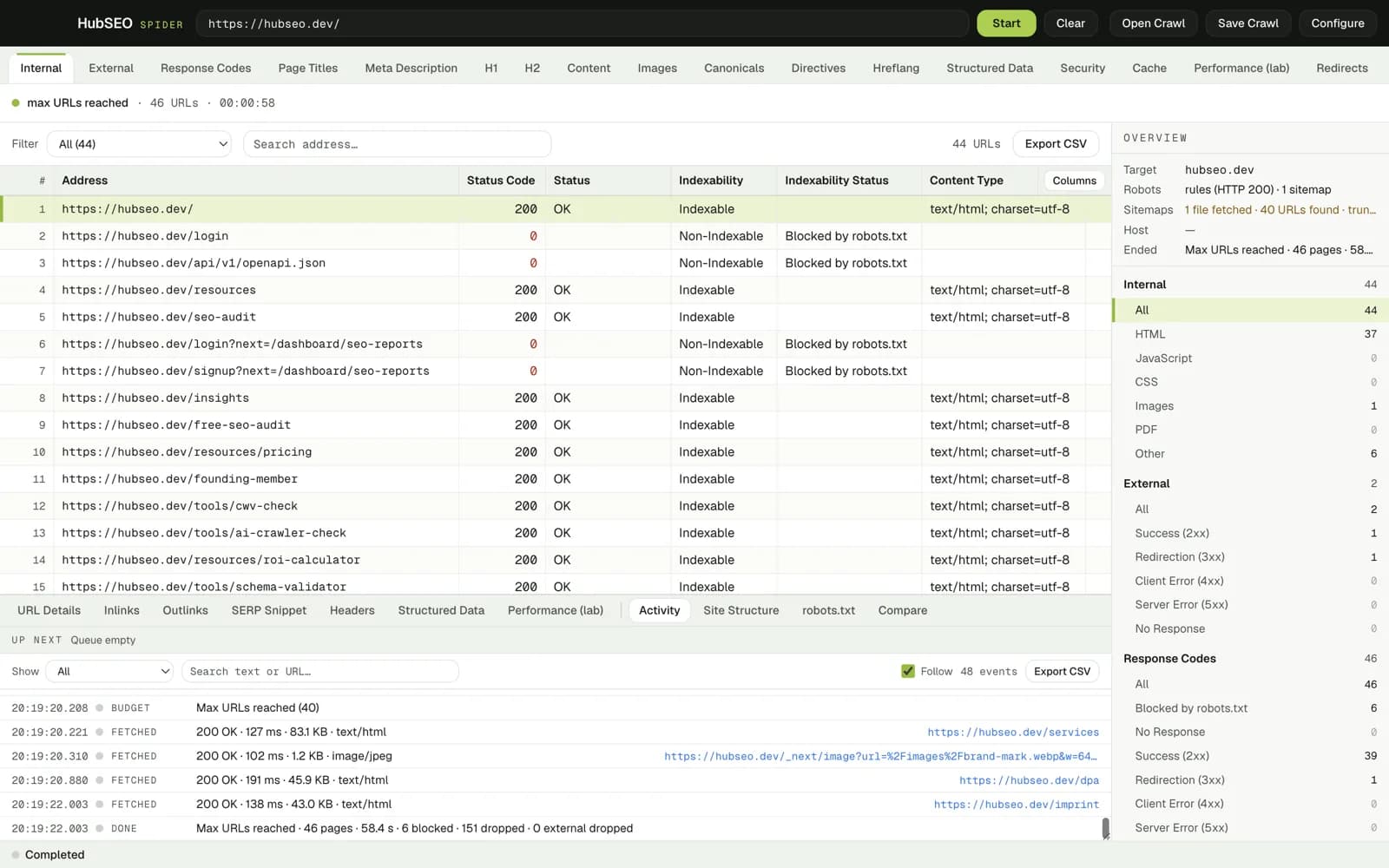
HubSEO Spider after a finished crawl of hubseo.dev: 44 internal URLs in the grid with status code, indexability and content type, filter tabs across the top, and an Overview column counting internal, external and response-code buckets.

What HubSEO Spider does

Two ways in: follow links, or paste a list

Spider mode starts from one URL, respects robots.txt and seeds from the XML sitemaps it finds. List mode takes URLs you paste or import. Either way the pages are rendered in a hidden Chromium on your Mac.

  • Threads, delay, URL budget and depth are set per crawl in Configure
  • External links are checked, not just collected
  • Custom extractors pull your own fields from each page
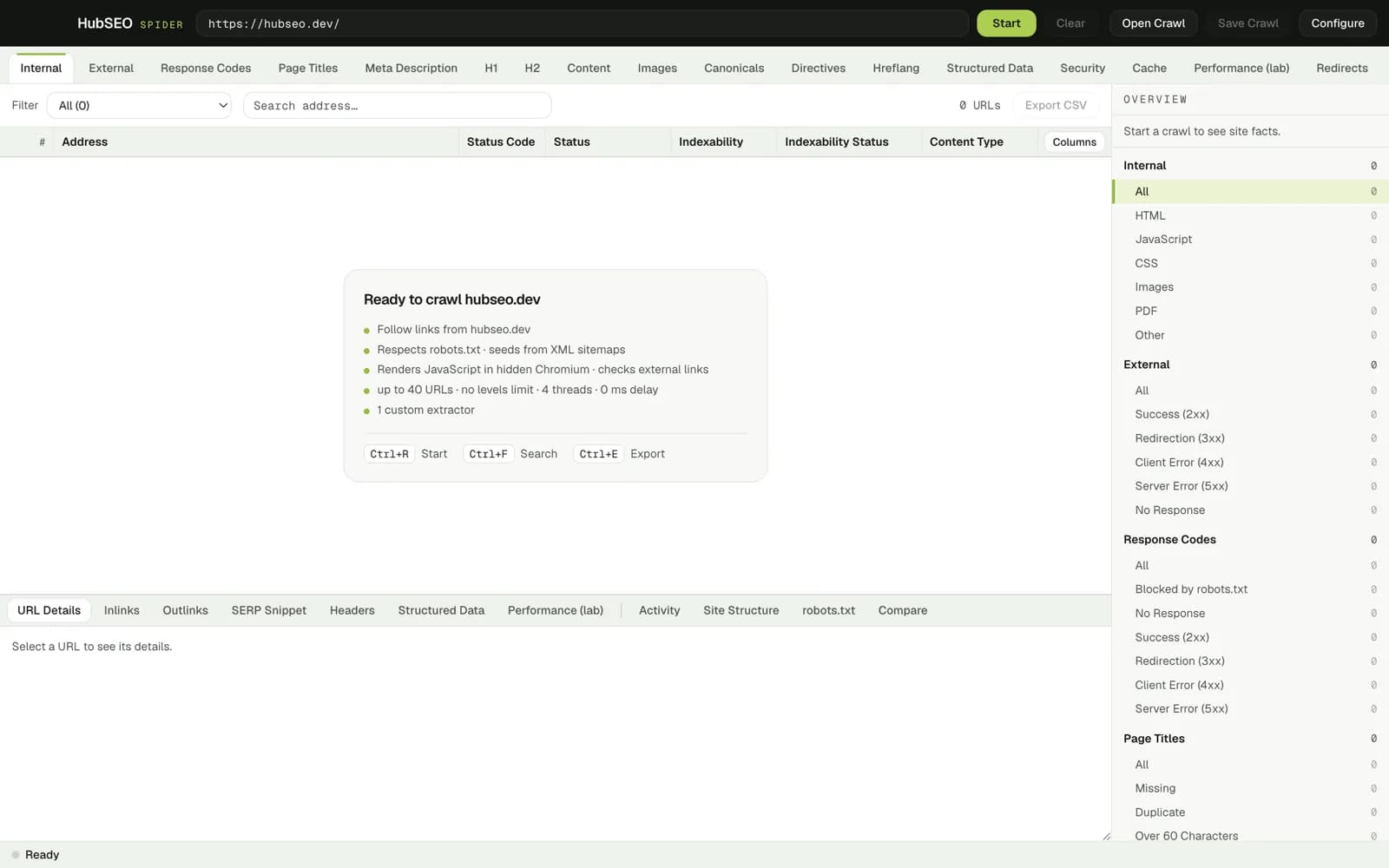
HubSEO Spider ready to crawl hubseo.dev: a card listing the run settings (follow links, respects robots.txt and sitemaps, renders JavaScript in hidden Chromium, a 40-URL budget, 4 threads, 1 custom extractor) with keyboard shortcuts for Start, Search and Export.

19 filter tabs over one grid

Internal, External, Response Codes, Page Titles, Meta Description, H1, H2, Content, Images, Canonicals, Directives, Hreflang, Structured Data, Security, Cache, Performance, Redirects, Sitemap and Custom. Each tab brings its own columns and sub-filters.

  • Content tab flags near-duplicate pages by simhash
  • Security tab shows HSTS, CSP and the other headers per URL
  • Export CSV from any tab, or export everything at once
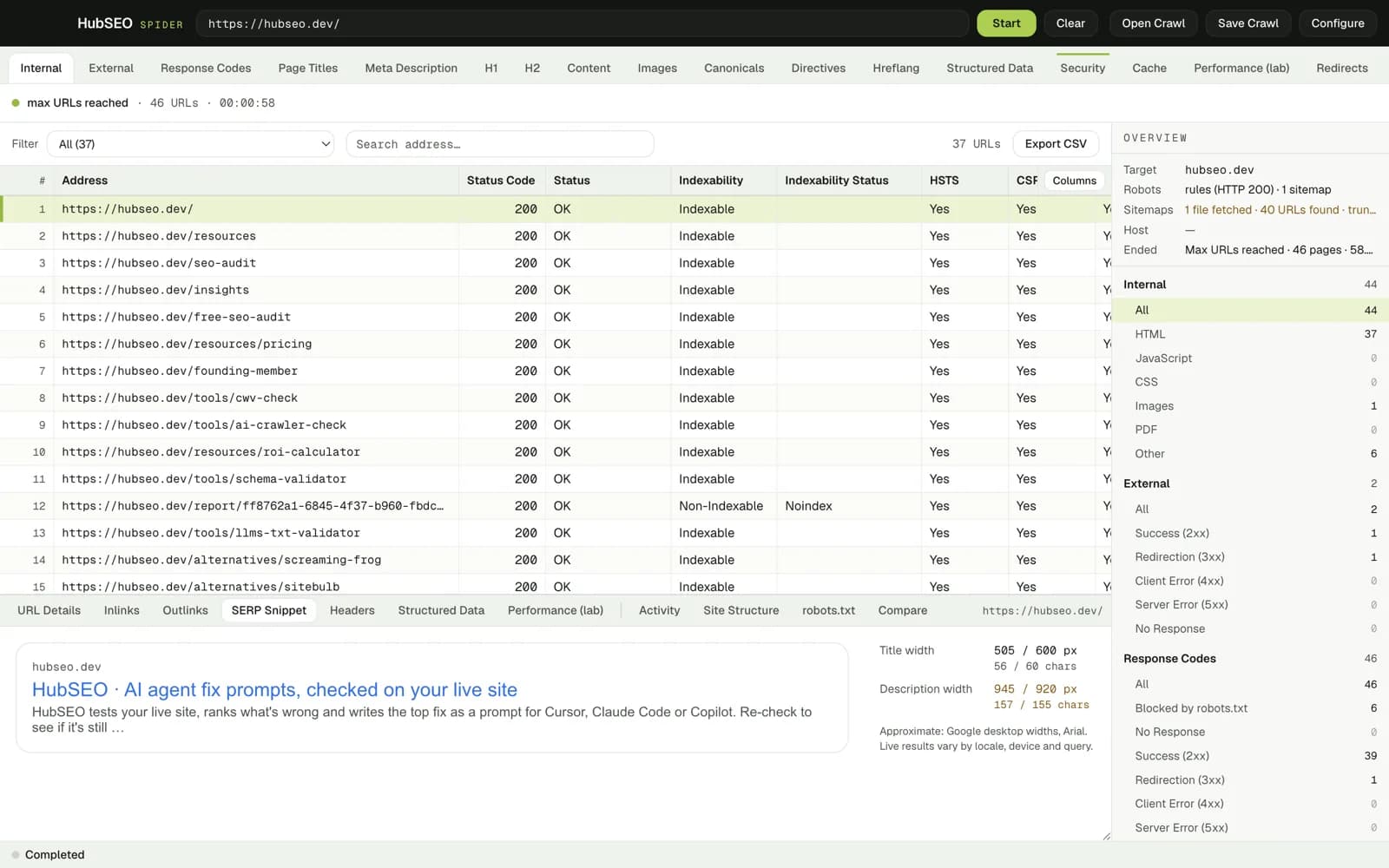
HubSEO Spider Security tab: 37 HTML URLs with status, indexability and HSTS and CSP columns reading Yes, a filter dropdown, address search and an Export CSV button.

Lab performance per page, with the thresholds printed

Select a URL and the Performance panel shows TTFB, DOMContentLoaded, Load, LCP and CLS from a single render on your machine, plus DOM nodes, resource count and transfer size. It says lab, not field, because that is what it is.

  • Web Vitals good and poor thresholds shown under each figure
  • Unthrottled single run in Spider's own hidden Chromium
  • Same panel for every crawled page, no extra tool
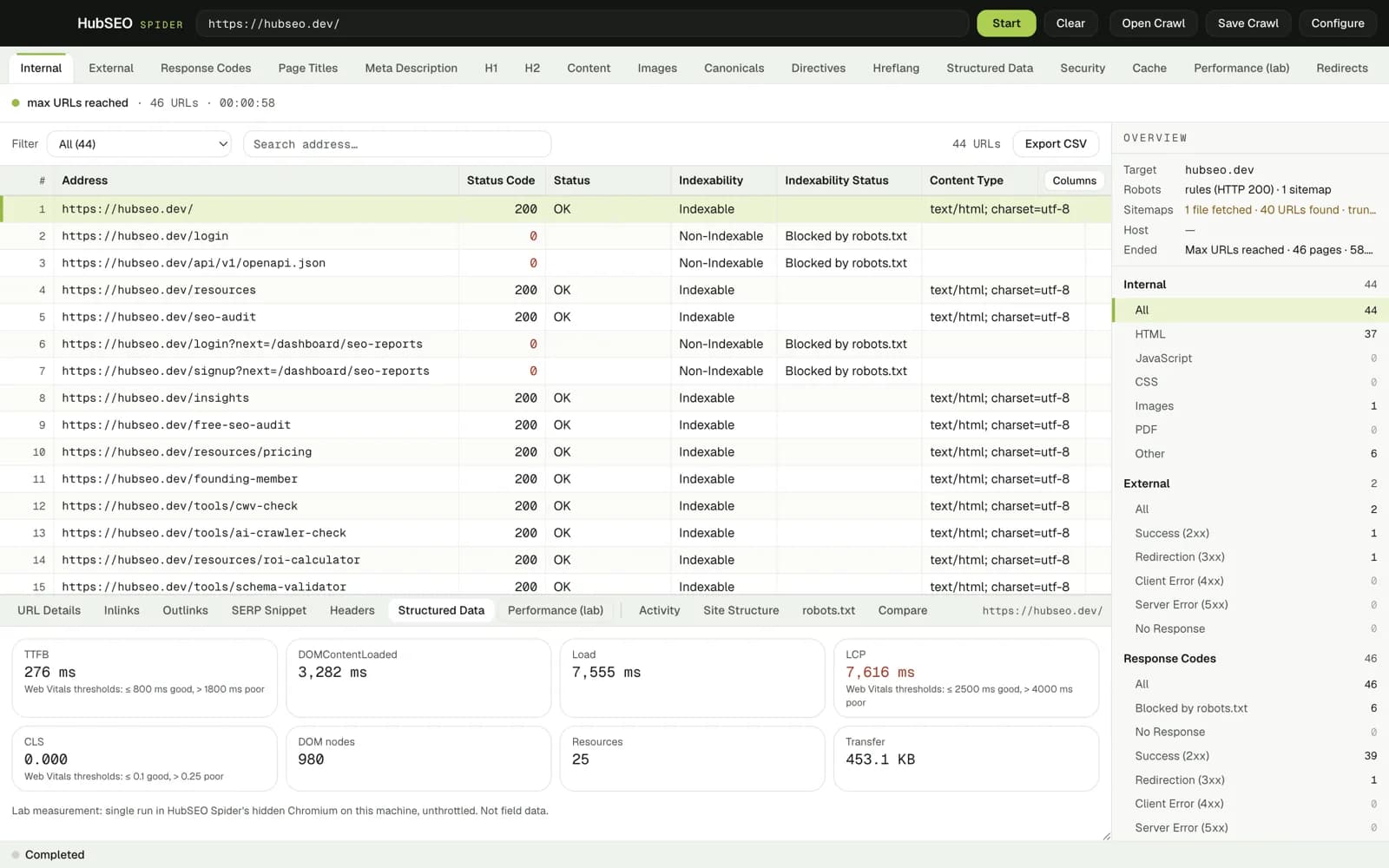
HubSEO Spider Performance panel for hubseo.dev: TTFB 276 ms, DOMContentLoaded 3,282 ms, Load 7,555 ms, LCP 7,616 ms marked poor, CLS 0.000, 980 DOM nodes, 25 resources, 453.1 KB transfer, with a note that this is a lab measurement, not field data.

11 panels for the selected URL

URL Details, Inlinks, Outlinks, SERP Snippet, Headers, Structured Data, Performance, Activity, Site Structure, robots.txt and Compare. Structured data is listed by type with the raw JSON-LD and a Copy button.

  • SERP Snippet measures title and description in pixels and characters
  • Headers and robots.txt exactly as the server returned them
  • Compare puts two saved crawls side by side
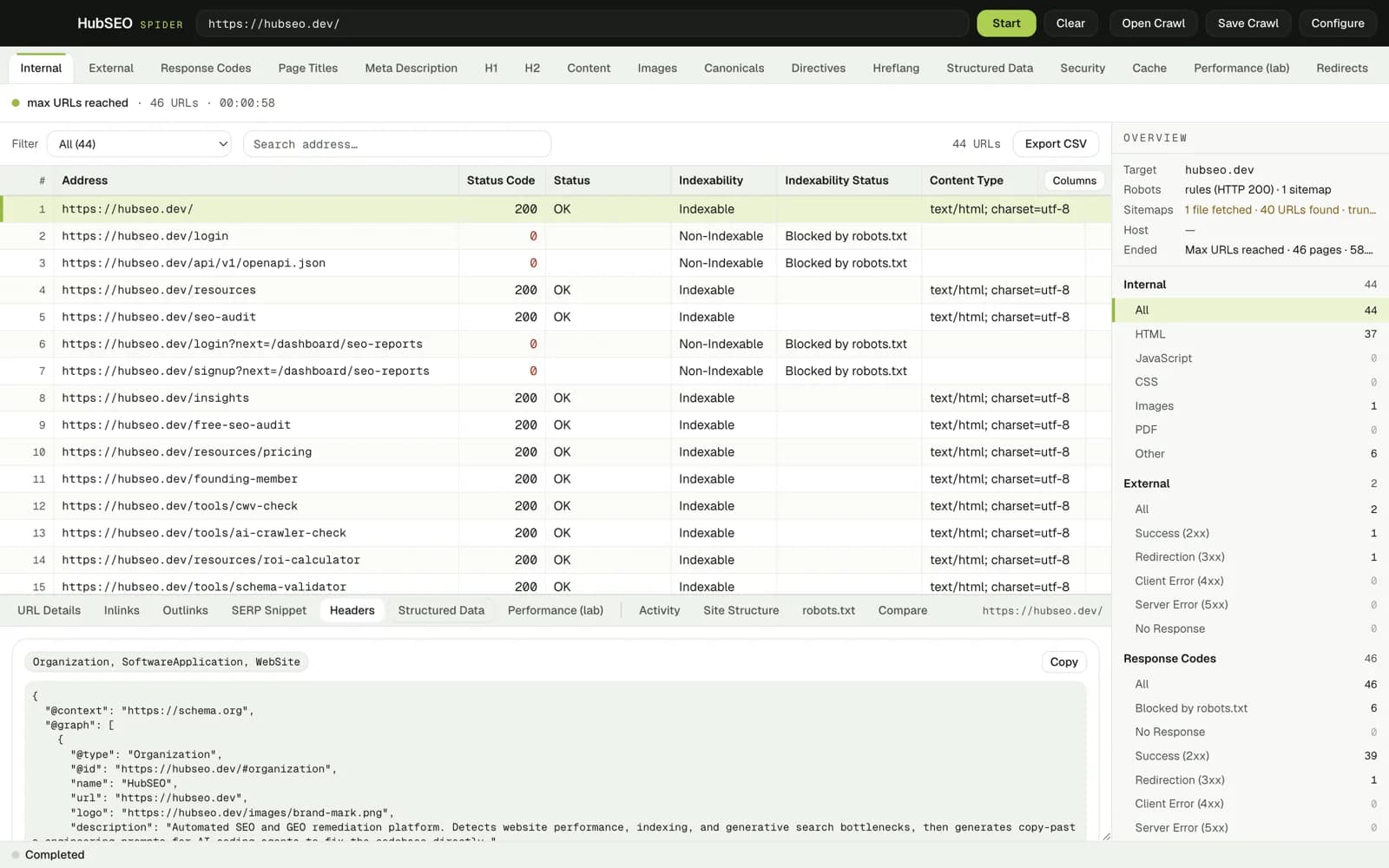
HubSEO Spider Structured Data panel for hubseo.dev: the detected types Organization, SoftwareApplication and WebSite, a Copy button, and the raw JSON-LD graph below.

SERP preview before you edit a title

The snippet is drawn at Google desktop widths in Arial, with the title and description width in pixels and characters next to it. Approximate by design, and labelled as such.

  • Title width against the 600 px, 60 character guide
  • Description width against 920 px, 155 characters
  • Works for every URL in the crawl, no re-fetch
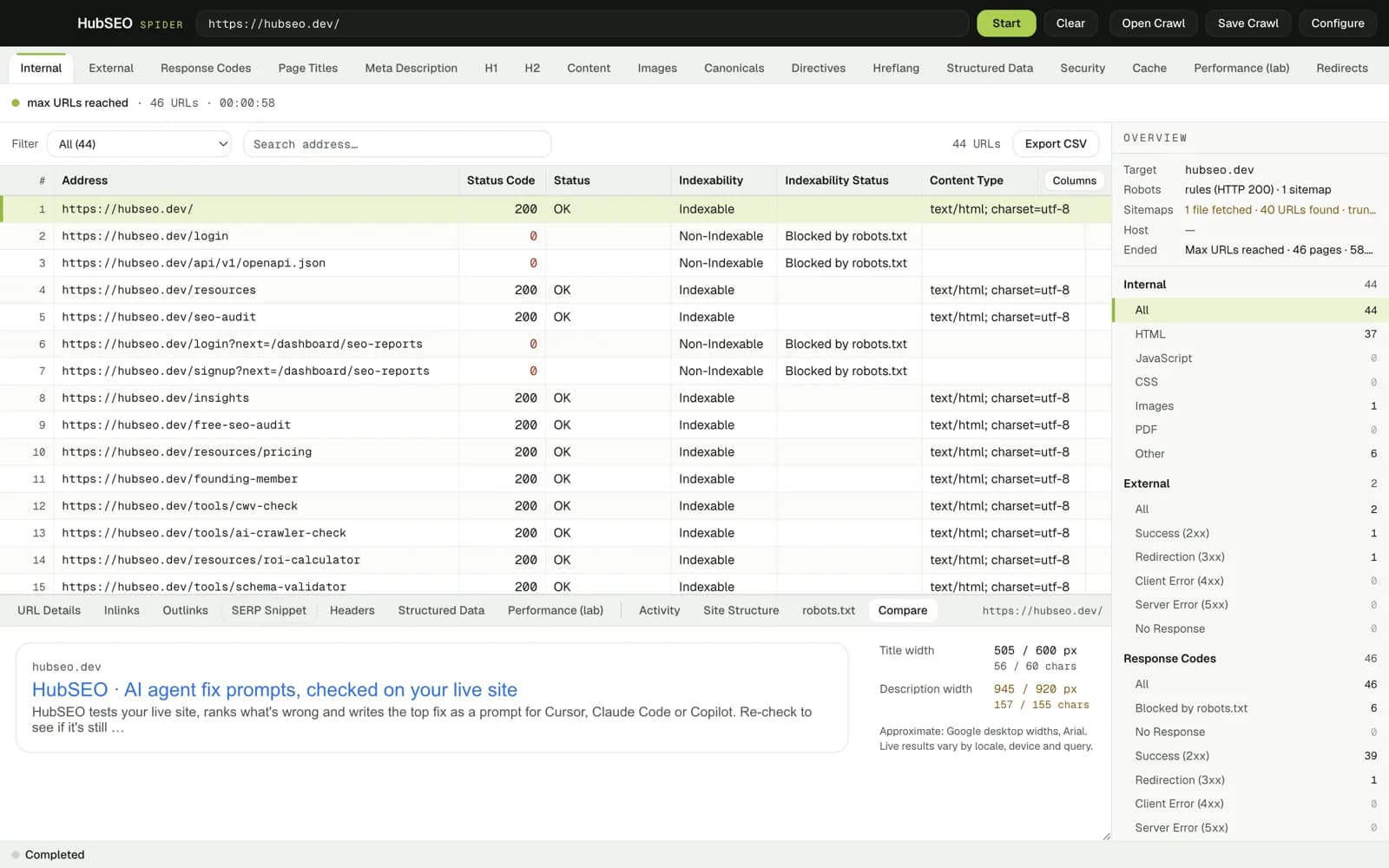
HubSEO Spider SERP Snippet panel for hubseo.dev: the rendered search result, title width 505 of 600 px and 56 of 60 characters, description width 945 of 920 px and 157 of 155 characters, with a note that live results vary.

Every fetch logged, every crawl saved

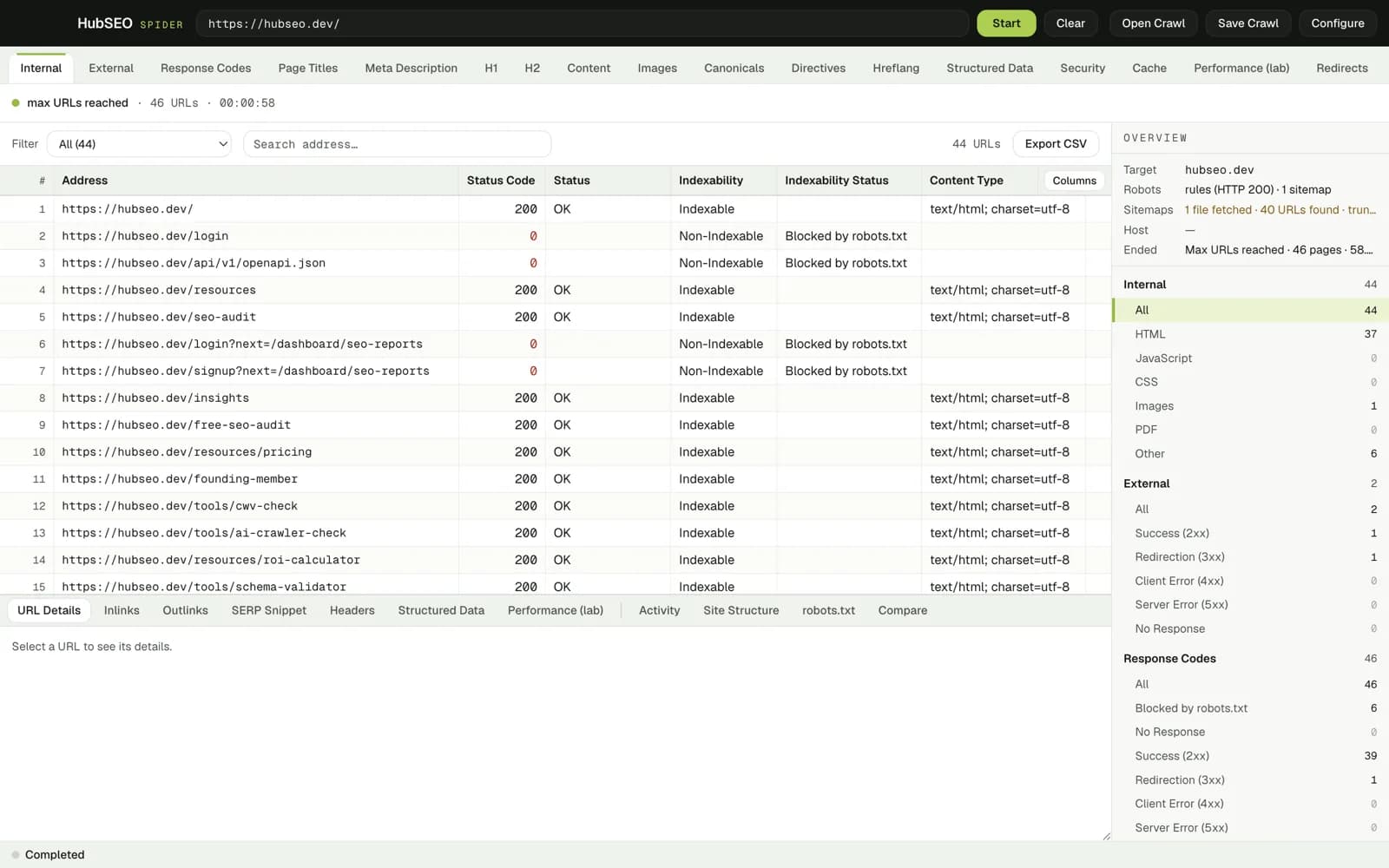
The Activity panel lists each event with its time, status, response time and size, and can be exported. Save Crawl writes the whole run to a file you can reopen later or compare against a fresh crawl.

  • Filter the log by event type or search by URL
  • Open Crawl brings back a saved run with all its panels
  • The done line states pages, time, blocked and dropped counts
HubSEO Spider Activity panel: a timestamped log of fetched URLs with status, response time, size and content type, a budget line reading Max URLs reached, and a final Done line summarising 46 pages in 58.4 seconds with 6 blocked and 151 dropped.

The one rule

Your crawl stays on your Mac

Spider runs entirely on your Mac. Pages are fetched and rendered locally, crawl files are saved where you choose, and nothing is sent to HubSEO or anyone else. There is no account, no licence key and no URL cap.

How HubSEO Spider compares with the free tier of Screaming Frog SEO Spider
HubSEO SpiderScreaming Frog SEO Spider, free tier
PriceFreeFree
URL limit per crawlNone500 URLs
PlatformBuilt for macOS 14+; Apple silicon and Intel disk imagesJava app for Windows, macOS and Linux

Frequently asked questions

Is HubSEO Spider really free?

Yes. There is no account, no licence key, no URL cap and no in-app purchase. It is built by the HubSEO team and sends none of your crawl data to us or anyone else.

Why does macOS warn me when I open it?

The app is ad-hoc signed and not notarised with Apple yet. On first launch right-click the app in Finder, choose Open, then confirm. After that it opens normally.

What is the difference between spider and list mode?

Spider mode starts at one URL and follows internal links, respecting robots.txt and seeding from XML sitemaps. List mode crawls exactly the URLs you paste or import, nothing more.

Does my crawl leave my Mac?

No. Pages are fetched and rendered locally, crawl files are saved where you choose, and exports are plain CSV. HubSEO receives nothing from the app.

Which download do I need?

Any Mac on macOS 14 or later. Choose the Apple silicon disk image (129 MB) for M-series Macs and the Intel disk image (136 MB) for Intel Macs. Apple menu › About This Mac shows which you have.

Free, no URL cap, and it stays on your Mac

Version 0.2.0 · 129 MB Apple silicon · 136 MB Intel · macOS 14 or later · Spider site

Ad-hoc signed, not notarised: on first launch right-click the app and choose Open, then confirm. macOS 14 or later; pick the Apple silicon or Intel disk image for your Mac.