HubSEO Spider · macOS · Free
See what a crawler sees. Every row is a real request.
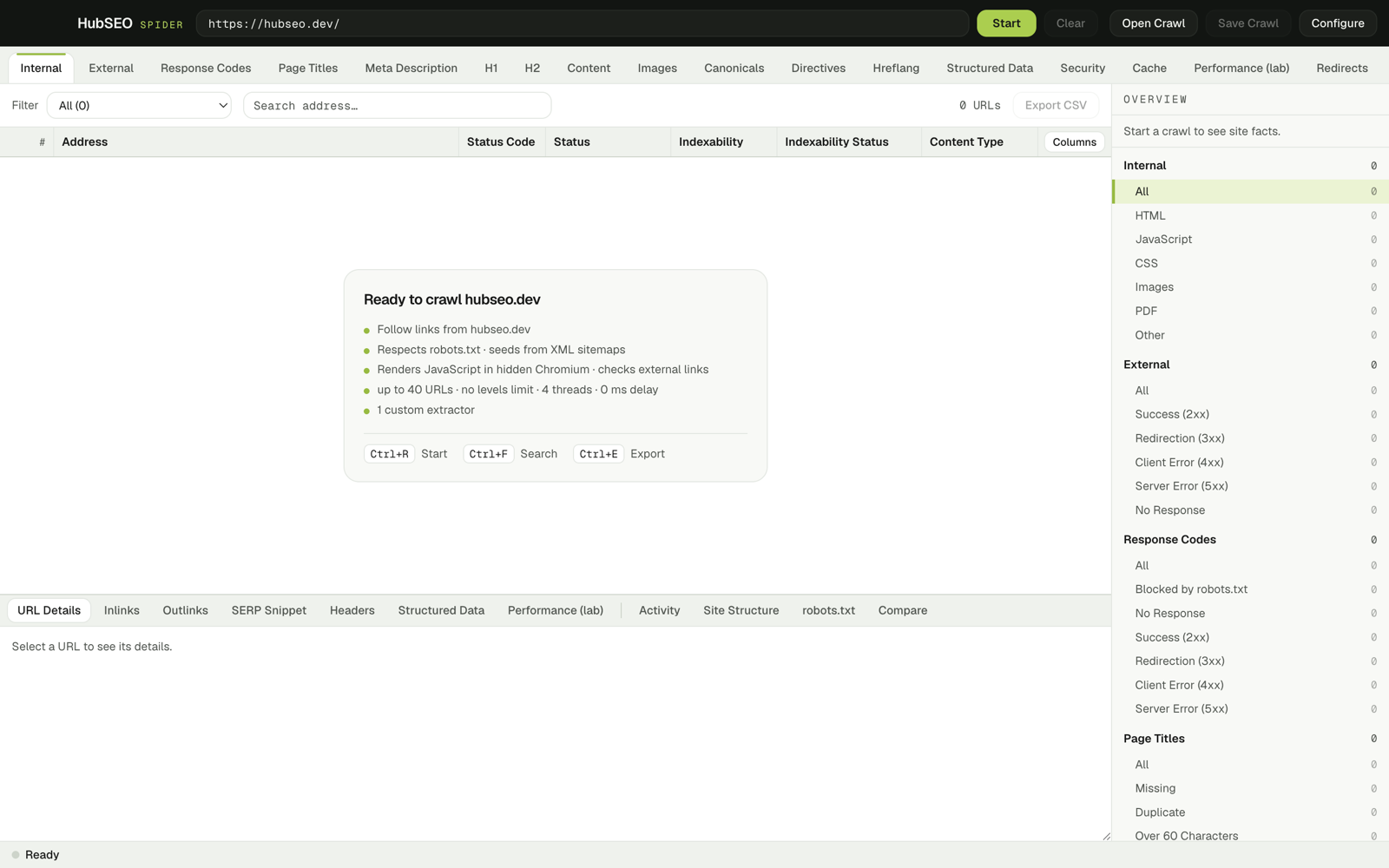
A desktop SEO crawler that logs every decision it makes: robots.txt, sitemaps, redirects, headers, JSON-LD, lab Web Vitals. Nothing simulated.
0.2.0 · free · no account · ad-hoc signed: right-click › Open on first launch
Also listed with HubSEO's free tools.
- STARTSpider crawl from https://hubseo.dev/ · concurrency 4 · delay 0 ms · Render JS on · max URLs 40 · max depth unlimited
- ROBOTSrobots.txt for https://hubseo.dev: rules (HTTP 200) · 1 sitemap
- SITEMAPSitemaps: 1 file fetched · 40 URLs found · truncated at limit
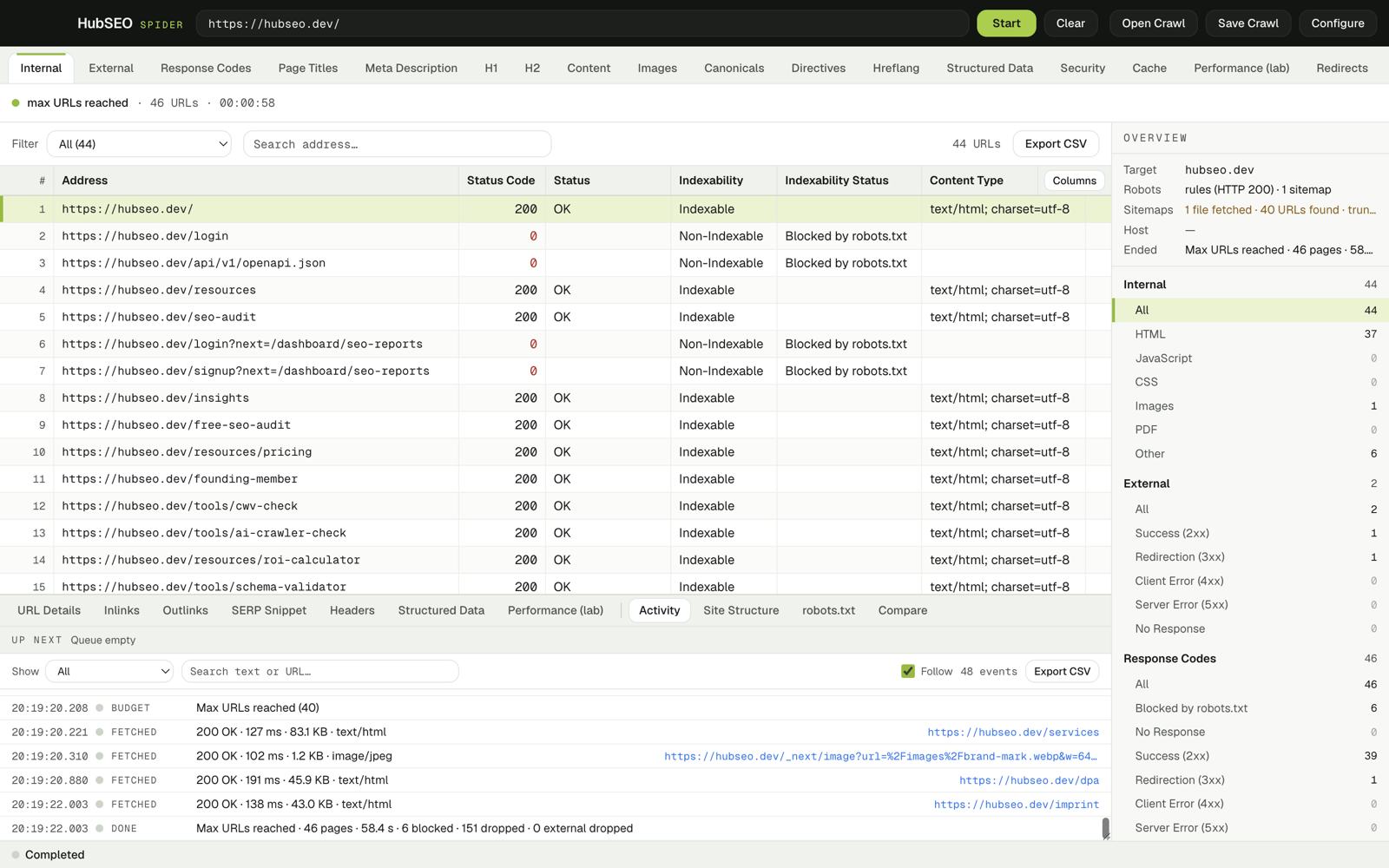
- FETCHED200 OK · 89 ms · 101.5 KB · text/htmlhttps://hubseo.dev/
- BLOCKEDBlocked by robots.txthttps://hubseo.dev/login
- FETCHED200 OK · 247 ms · 83.1 KB · text/htmlhttps://hubseo.dev/services
- FETCHED200 OK · 194 ms · 43.0 KB · text/htmlhttps://hubseo.dev/imprint
- FETCHED200 OK · 102 ms · 1.2 KB · image/jpeghttps://hubseo.dev/_next/image?url=%2Fimages%2Fbrand-mark.webp&w=64…
- BUDGETMax URLs reached (40)
- DONEMax URLs reached · 46 pages · 57.2 s · 6 blocked · 182 dropped · 0 external dropped
Activity log · hubseo.dev · 27 Oct 2026 · Render JS on · 40-URL budget
What you get
- Filter tabs
- 19
- Internal to Custom Extraction, each with its own filters
- Detail panels
- 11
- 7 per URL, 4 crawl-wide
- Crawl files
- Save · Compare
- .hubseo: gzip NDJSON, diff two crawls
- Render JS
- Lab metrics
- TTFB, LCP, CLS, DOM nodes, transfer
Internal
One row per URL. One column per fact.
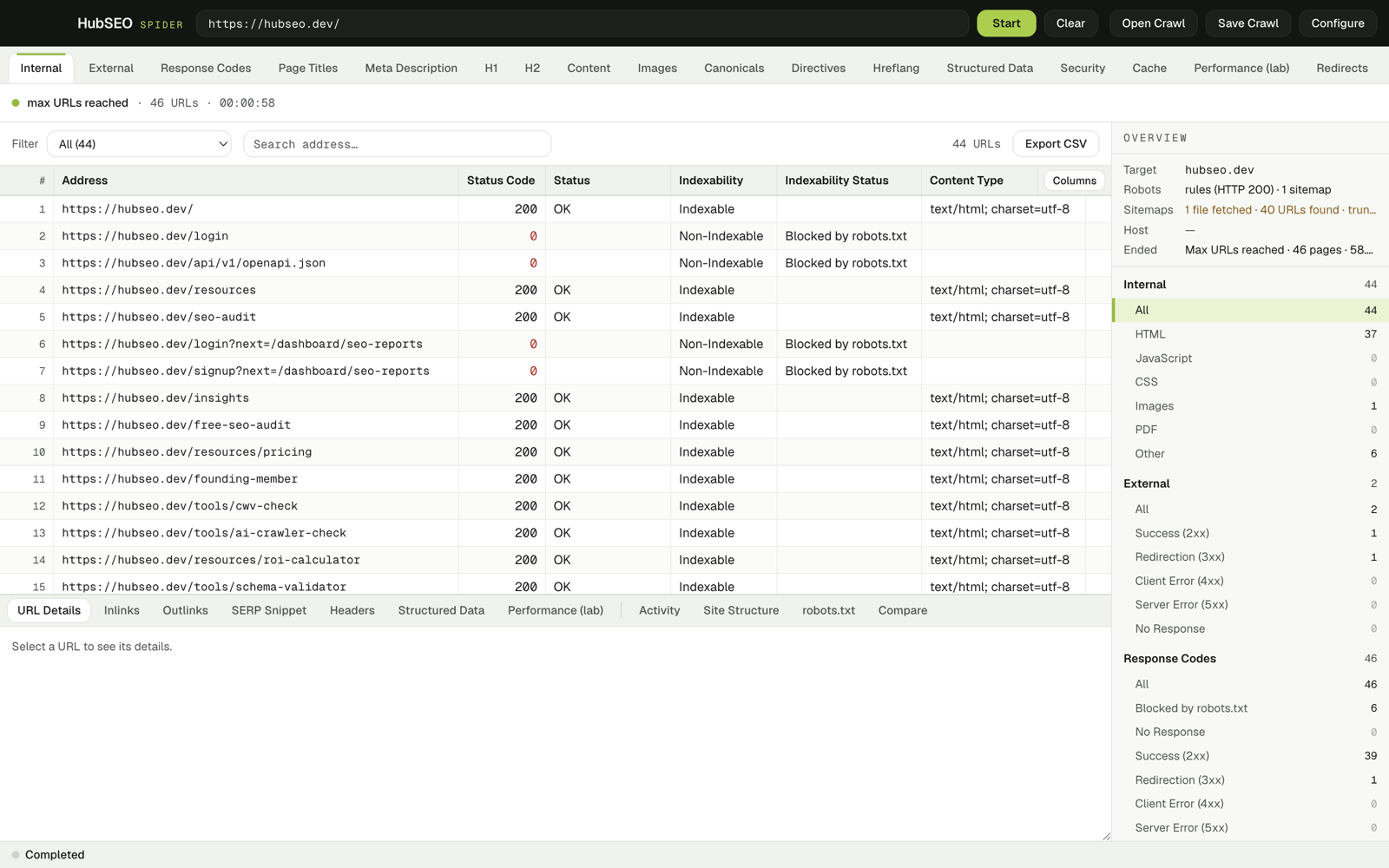
The grid is the crawl. Filter it, search it, export any tab to CSV. Select a row and the detail panels show the request behind it.
Response
- Status code and reason phrase
- Indexability, and why
- Content type, size, response time
- Redirect target
- In-sitemap flag
On the page
- Title, meta description, H1, H2
- Canonical, meta robots, X-Robots-Tag, meta refresh
- lang and hreflang
- Word count, content hash, simhash near-duplicates (≤ 3 bits)
- Image count, images missing alt, images missing width or height
- Mixed content
Around the page
- Response headers: security and cache
- JSON-LD raw, with parse errors
- Lab Web Vitals, with Render JS
- Custom CSS extractors: text, outer HTML or attribute, optional regex
- Inlinks and outlinks with anchor text
- Internal link score: PageRank, d = 0.85, 20 iterations
19 grid tabs
- Internal
- External
- Response Codes
- Page Titles
- Meta Description
- H1
- H2
- Content
- Images
- Canonicals
- Directives
- Hreflang
- Structured Data
- Security
- Cache
- Performance (lab)
- Redirects
- Sitemap
- Custom
Detail panels
- URL Details
- Inlinks
- Outlinks
- SERP Snippet
- Headers
- Structured Data
- Performance (lab)
- Activity
- Site Structure
- robots.txt
- Compare
Measured in pixels, not characters
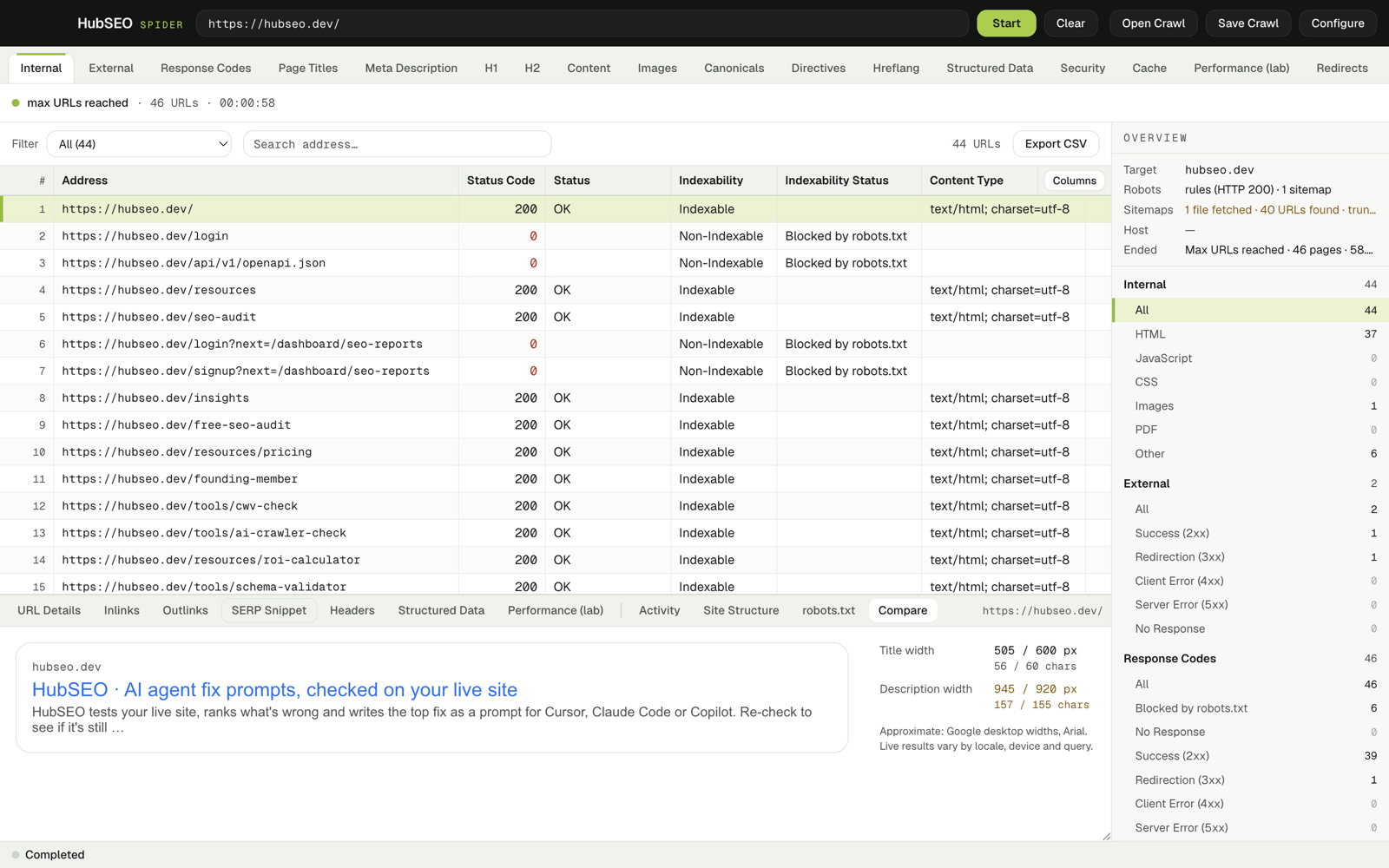
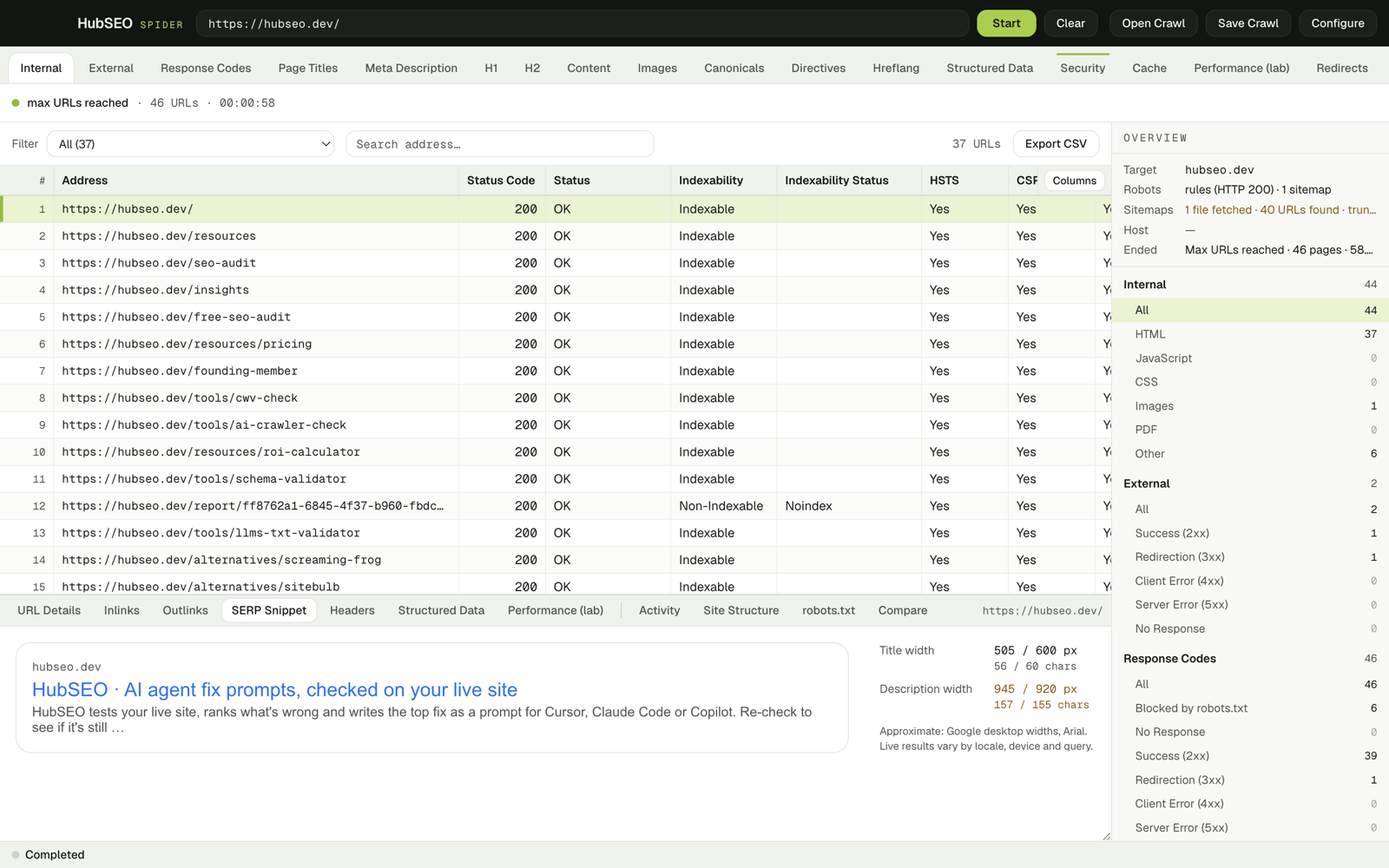
The SERP Snippet panel draws the title and description at Google desktop widths. On the hubseo.dev home page the title fits and the description does not.
| Title | 505 / 600 px | 56 / 60 chars |
|---|---|---|
| Description | 945 / 920 px | 157 / 155 chars |
Activity
The crawl keeps a paper trail.
Every robots rule, sitemap fetch, block, redirect and budget hit is a line in the activity log. Filter by kind, search by URL, follow it live, export it as CSV.
- URLs
- 46
- 44 internal · 2 external
- Duration
- 57.2 s
- concurrency 4 · delay 0 ms
- Ended
- Max URLs reached
- 40-URL budget
- Blocked
- 6
- by robots.txt
- Dropped
- 182
- links over the queue cap
- In sitemap
- 23
- flagged in-sitemap
- Headers
- 37
- HTML pages with response headers
- Redirects
- 1
- target recorded
Performance (lab)
Lab Web Vitals from a hidden Chromium.
With Render JS on, each page is loaded once in a sandboxed window on your Mac. The panel shows what that run measured and where the Web Vitals thresholds sit.
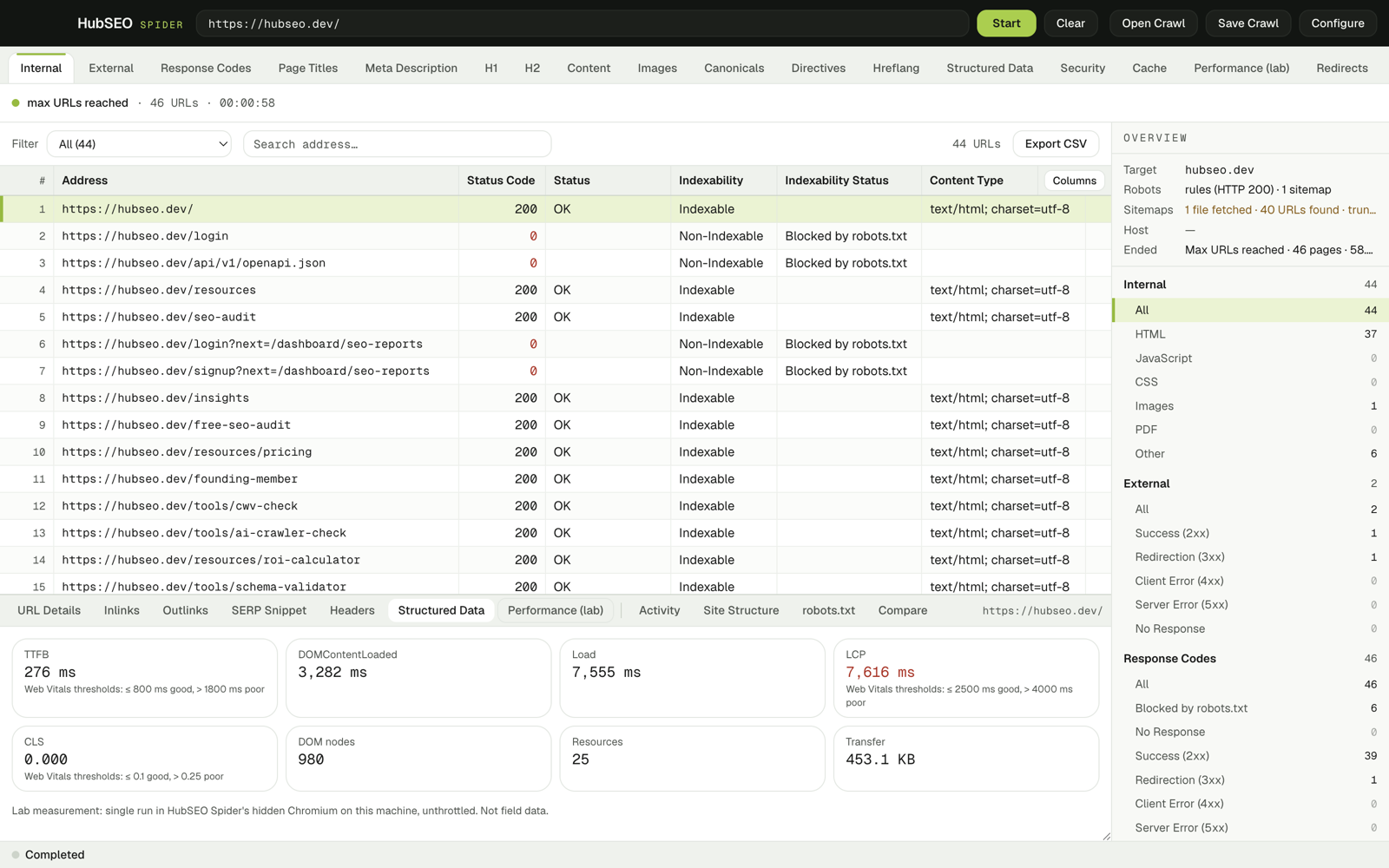
| Metric | hubseo.dev | Good | Poor |
|---|---|---|---|
| TTFB | 276 ms | ≤ 800 ms | > 1800 ms |
| DOMContentLoaded | 3,282 ms | ||
| Load | 7,555 ms | ||
| LCP | 7,616 ms | ≤ 2.5 s | > 4 s |
| CLS | 0.000 | ≤ 0.1 | > 0.25 |
| DOM nodes | 980 | ||
| Resources | 25 | ||
| Transferred | 453.1 KB |
Lab: single run in a hidden Chromium on your Mac, unthrottled. Not field data.
Security
Headers, kept as sent.
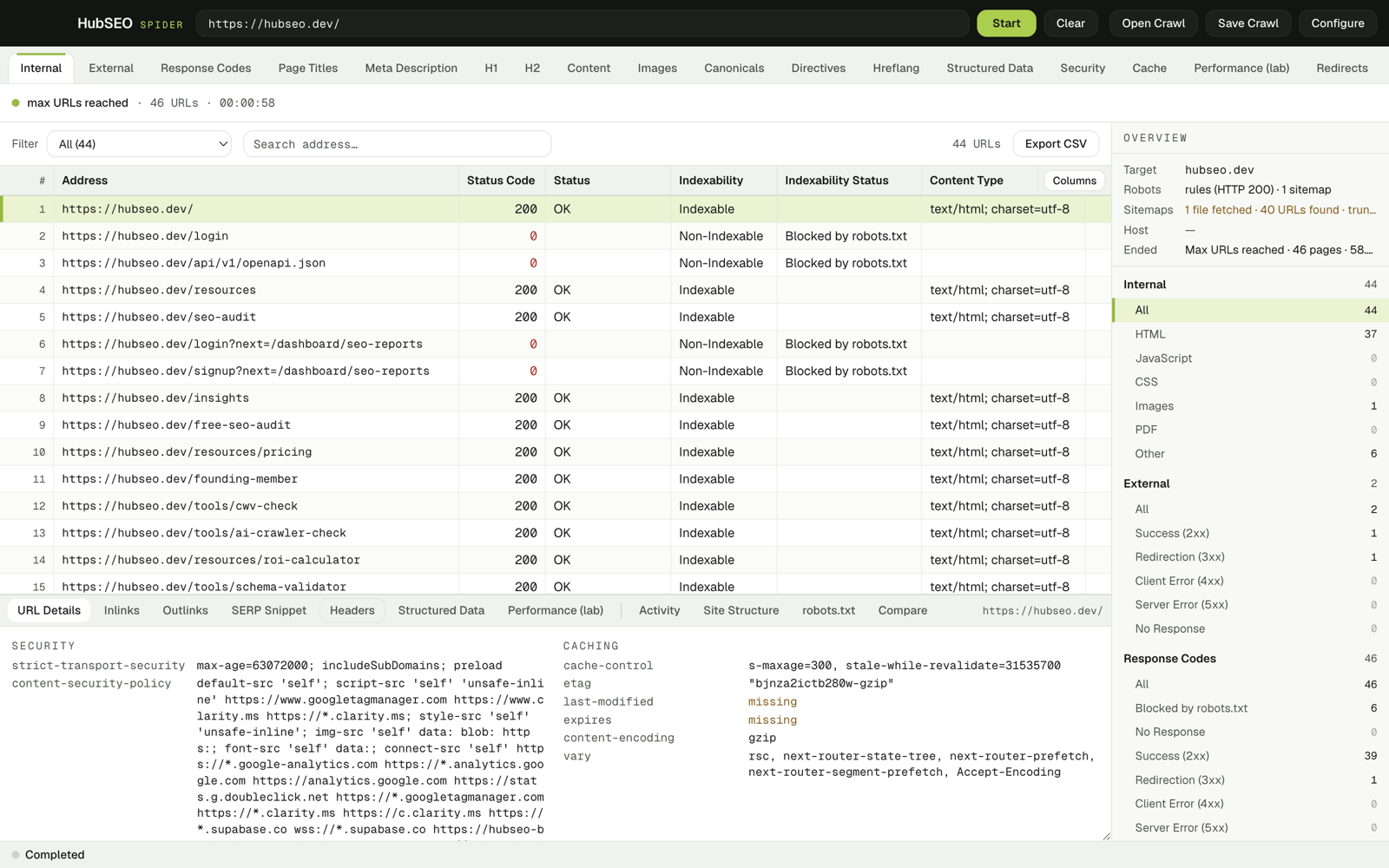
The Security and Cache tabs answer yes or no per URL. The Headers panel shows the raw values behind each answer.
Security headers
- Strict-Transport-Security
- Content-Security-Policy
- X-Content-Type-Options
- X-Frame-Options
- Referrer-Policy
Cache headers
- Cache-Control
- ETag
- Last-Modified
- Content-Encoding
Missing values are marked missing. Mixed content is flagged per page.
Structured Data
JSON-LD, site structure, your own selectors.
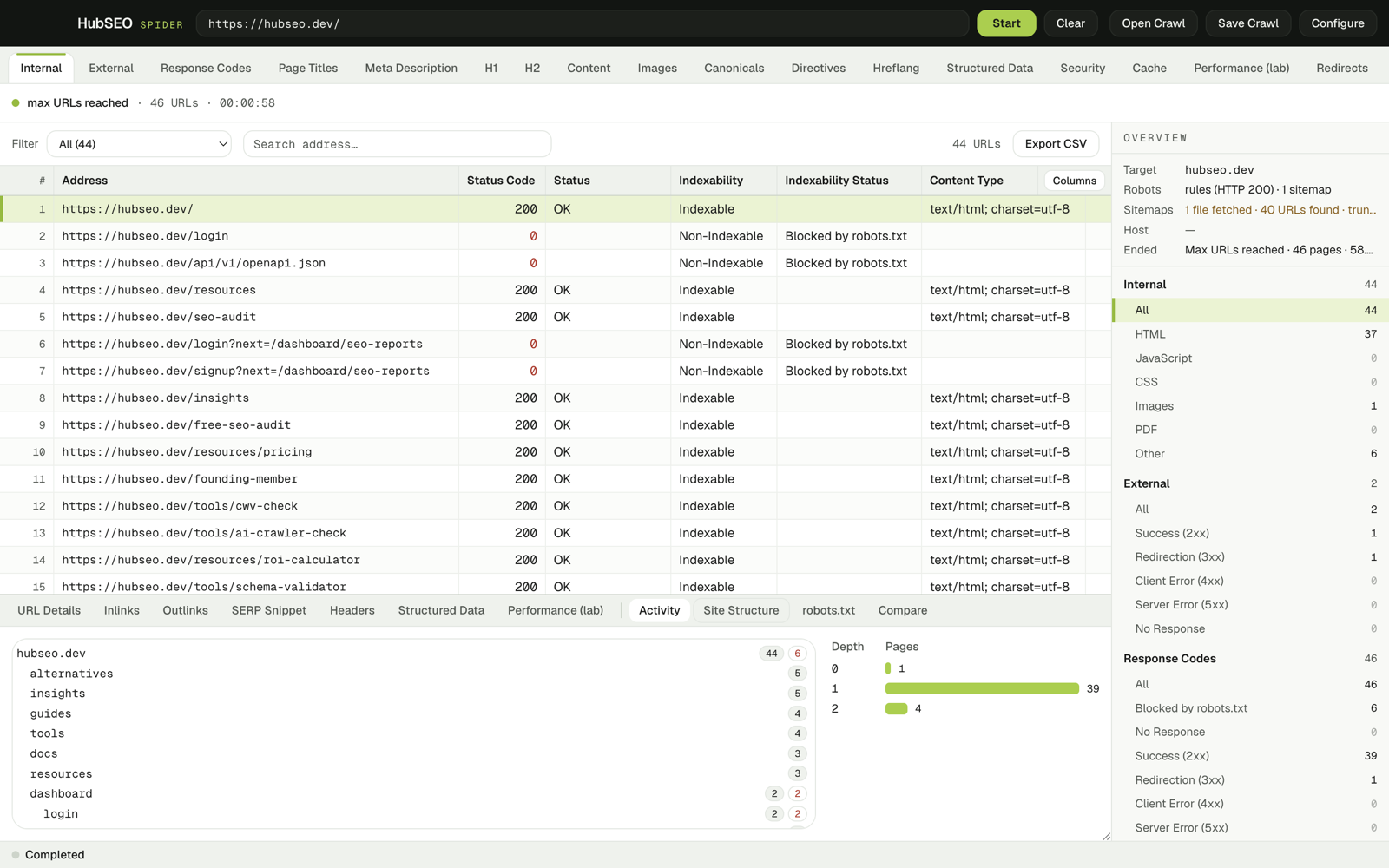
Structured data is kept raw, with parse errors. The site tree shows folders and crawl depth. Custom extractors pull anything else.
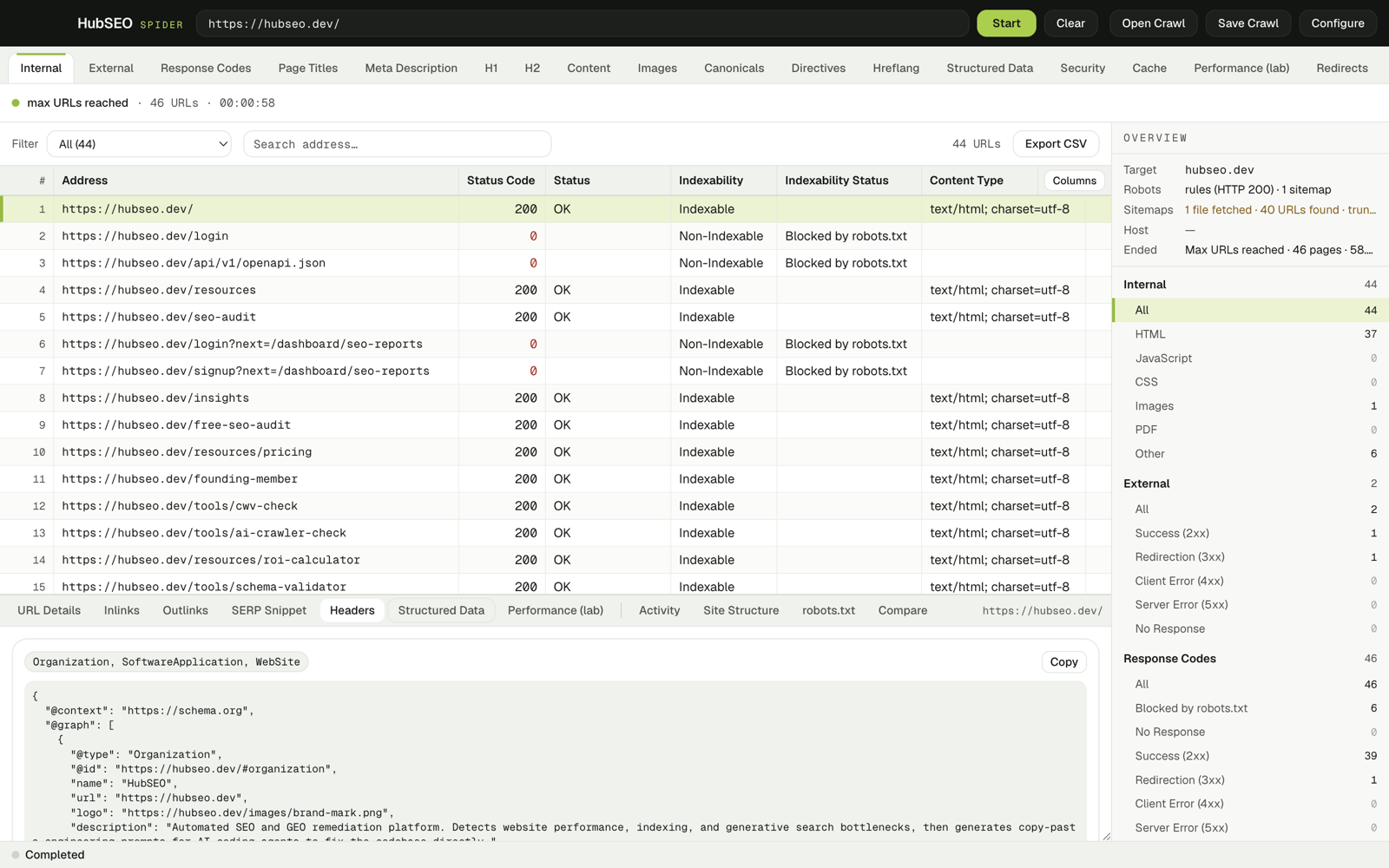
What the home page declared
- Organization
- SoftwareApplication
- WebSite
Custom extractors
A CSS selector per column. Capture text, outer HTML or an attribute, with an optional regex. Results land in the Custom tab and export like any other column.
Site structure
Folders come from URL paths. Depth comes from the links the crawler followed: sitemap URLs are released only after the link queue drains, so depth stays true.
How a crawl runs
Six steps, in this order.
- 01
robots.txt
Fetched for the start origin and parsed per RFC 9309. Crawl-delay is honoured.
- 02
Sitemap discovery
From Sitemap: lines in robots.txt and from /sitemap.xml.
- 03
Fetch
N workers share one global politeness gap.
- 04
Render
Optional. Each page loads in a hidden, sandboxed Chromium window.
- 05
Parse and extract
The HTML is parsed with cheerio and every column is filled.
- 06
Follow links
Breadth-first. Sitemap URLs are released after the link queue drains, so depth stays true.
Compare
Against the free Screaming Frog.
Both are desktop crawlers you install. One of them stops at 500 URLs.
| HubSEO Spider | Screaming Frog, free | |
|---|---|---|
| Crawl limit | None built in. You set the Max URLs budget. | 500 URLs |
| Price | Free | Free. £199 per year lifts the limit. |
| Platform | macOS app, Apple silicon and Intel builds | Windows, macOS, Linux |
| Account | None. No telemetry, no update check. | None |
Screaming Frog figures from its pricing page, checked 30 Oct 2026. Crawl size in HubSEO Spider is bounded by your Mac's memory and disk.
Download
Free. No account. Runs on your Mac.
The app talks only to the site you crawl. No telemetry. Crawls stay on your Mac.
Ad-hoc signed, not notarised. On first launch, right-click the app and choose Open, or allow it under System Settings › Privacy & Security. 172 automated tests: 27 app, 145 engine. Also listed with HubSEO's free tools.
Shortcuts
| ⌘R | Start |
|---|---|
| ⇧⌘P | Pause or resume |
| ⌘. | Stop |
| ⌘O | Open crawl |
| ⌘S | Save crawl |
| ⌘E | Export CSV |
| ⇧⌘E | Export all tabs |
| ⌘F | Search |
| ⌘, | Configure |
Files
Crawls save as .hubseo: gzip NDJSON that streams multi-million-link crawls.
CSV export of any tab or filter, all tabs at once, the link table and the activity log.
Privacy
The app talks only to the site you crawl. No account, no telemetry. Crawls stay on your Mac.
Made by HubSEO.
FAQ
Questions before you install.
Why does macOS warn me on first launch?
The build is ad-hoc signed and not notarised, because there is no Developer ID certificate yet. Right-click the app and choose Open, or allow it under System Settings › Privacy & Security. You only do this once.
Which build do I need?
Apple silicon for M-series Macs, Intel for older ones. Apple menu › About This Mac shows the chip. The page orders the buttons by what your browser reports, but both builds are always offered.
Is there a URL limit?
No built-in cap. Max URLs, max depth and request delay are settings you choose per crawl. Crawl size is bounded by your Mac's memory and disk.
What leaves my Mac?
Requests to the site you crawl, and to external link targets if you ask it to check them. No account, no telemetry, no update check. Crawls stay on your Mac unless you save or export them.
What is a .hubseo file?
A saved crawl: gzip-compressed newline-delimited JSON, one line per page and per link. It streams in both directions, so multi-million-link crawls open without loading everything into memory. The Compare panel diffs two of them.
How do lab Web Vitals work?
With Render JS on, each page loads once in a hidden, sandboxed Chromium window on your Mac. The panel reports TTFB, DOMContentLoaded, load, LCP, CLS, DOM nodes, resource count and transfer size from that single unthrottled run. It is lab data, not field data.